



Clean Energy CU Loan Payment Options
Managing Your Clean Energy CU Loan
Managing your clean energy financing should be just as sustainable and effortless as the investments you’ve made in your home and vehicle.
At Clean Energy Credit Union, we provide flexible loan payment options designed to keep your solar, electric vehicle, or green home improvement loans seamlessly on track. Whether you prefer to set up automated monthly transfers, make principal-only payments to accelerate your payoff, or utilize our secure online portal, keeping up with your accounts is entirely hassle-free. Members can even take advantage of our new MessagePay feature—a convenient service that sends secure text reminders and allows you to make quick, on-the-go payments directly from your phone via text or a web portal using an external debit card or bank account.
New loan? Your payments are already set up!
Rest assured, if you signed documents at closing, your standard monthly loan payments are already scheduled. No action is needed unless you want to change the account, make extra or principal-only payments, or pay early.
Refer to your closing documents for details about your payment amount, the account your payments will be withdrawn from, and your payment start date.
You can track your payments and account balance within online banking, if you haven’t already register here using your member number provided via your welcome email. Visit our Online & Mobile Banking enrollment page to follow step-by-step instructions.
Please note: If your loan originated through Atmos, you will receive a notification 30 days before your payments begin with the exact payment amount and start date.
Explore These Payment Options
At Clean Energy Credit Union, we offer flexible loan payment options designed to help you stay on track with your financing for solar, electric vehicles, and green home improvements. Whether you prefer automated transfers or need to make an urgent payment, we have a solution for you.
Standard Monthly Payments
Within 30 – 45 days of your loan closing, you will begin making monthly payments via the account details your provided us with during the loan application process. You can find these details on your loan documents.
Principal-Only Payments
Principal-only payments allow you to reduce your loan balance faster by applying the full amount directly to the principal. If you’d like to make a principal only payment, please have your payment in one of your clean energy cu accounts and call, email or chat us requesting a principal only payment.
Contact UsInstant Loan Payment From Any External Account
You can make additional loan payments, pay with your debit card or get caught up on missed payments via this loan payment portal. Refer to the easy four steps below to set up loan payments for a quick and easy payment process.
Loan Payment PortalBy Phone
Call us to make a payment or pay off your loan over the phone. A $10.00 processing fee applies
Follow these four easy steps to setup loan payments
Life can get hectic, and it’s easy for loan payments to slip through the cracks. To keep you from worrying about late fees, Clean Energy Credit Union proudly provides a convenient tool designed for those moments when time is of the essence. With our loan portal, making a payment quickly to avoid late penalties is possible and cost-effective.
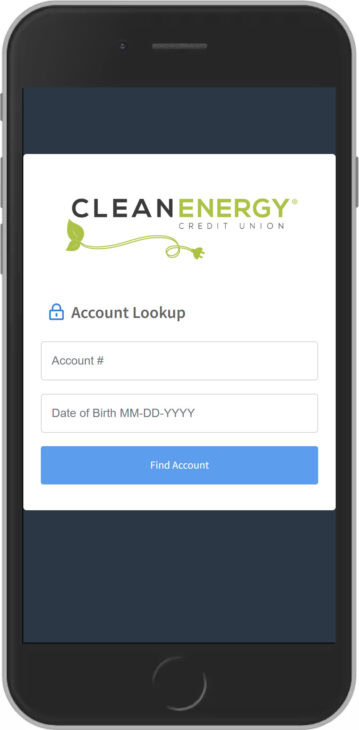
ONE: Account Lookup for first time users
The first time you visit our loan payment portal you will need to authenticate your account with your Account Number and Date of Birth.
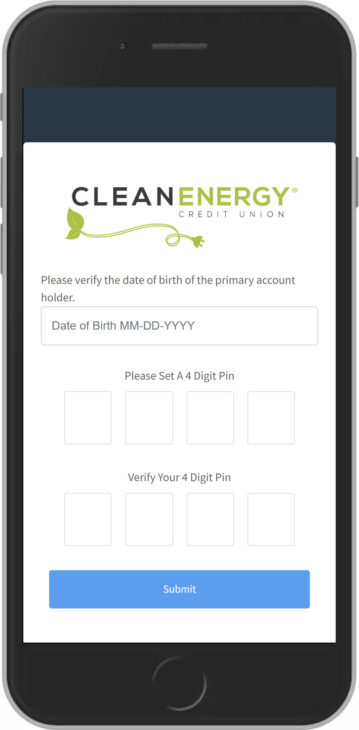
TWO: Creating Your PIN
Next, you will be asked to set a four digit PIN. This PIN will be used to make subsequent payments.
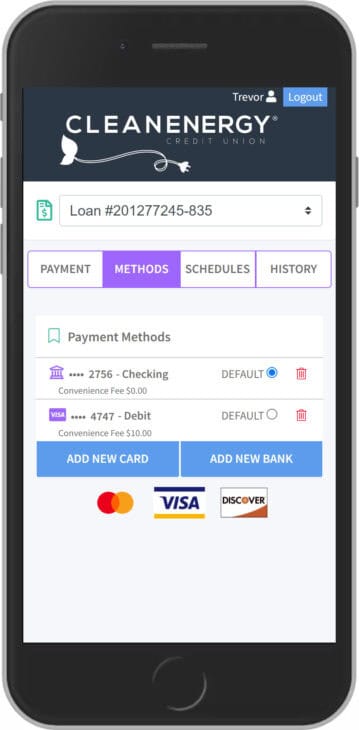
THREE: Add a Payment Method
Select “Methods” on the top menu. From this screen you can add new cards or bank accounts to pay from. You can add multiple methods and select which method you would like to be your “default” payment method.
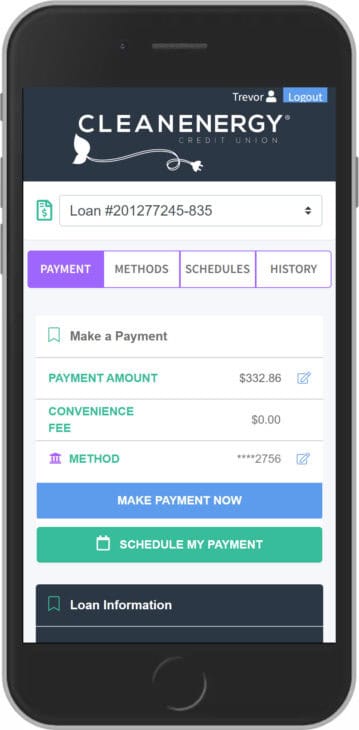
FOUR: Make a Payment
Click the PAYMENT button to make your payment. To edit your payment amount or to select a different payment method, touch the pencil icon to the right of the amount.
Once your account is set up, paying is quick and easy:
- Receive the Reminder: You will receive a text payment reminder from 1 (720) 740-3613.
- Reply to Pay: Reply to the text message with the word “Pay”.
- Verify Your Account: Enter your 4-digit PIN when prompted to verify your identity.
- Get Confirmation: Once verified, your payment will process, and you will receive a confirmation text. Please Note: Payments may take up to three (3) business days to officially post to your account.
Loan Payment Portal Details
The Clean Energy CU loan payment portal is an intelligent step to save money and keep your account in good standing. This cutting-edge platform enables you to initiate payments swiftly from your mobile device through a simple text message, leveraging any external bank account.
When you verify your account for the first time you will have to setup the following:
- 4 digit PIN: once you have entered your account number and date of birth, it will prompt you to create a 4 digit pin. Store this information in a secure place as you will need this pin number to verify future payments.
- Preferred method of payment: to make a payment you will have to add your preferred form of payment in the portal. You can do this by selecting ADD NEW DEBIT CARD or ADD NEW BANK ACCOUNT which will prompt a secure website for you to input your information. If done correctly, there will be a message stating ‘Payment Method Success’ and you will be redirected to the payment portal.
- Once your account has been successfully verified, you will be directed to the payment portal where you’ll be able to see all of your loans and will also be able to select your preferred payment method.
- You will receive a text message informing you of the amount due on your loan.
- You will be able to review your payment options or you will be able to opt out of our text message service by texting “STOP”.
- The link will take you to a portal where you will be asked to verify your account with your account number and date of birth.
- Maximum $3000 ACH payment amount and/or $1500 max debit card payment per transaction.
- Limit of 2 payments per loan per day and a limit of 3 total loan payments per week.
- Encrypted information guarantees your information is secure.
- Convenient ways to pay from an external account: text, website, online/mobile banking.
- Payments accepted from checking accounts, savings accounts.
The small convenience fee applied to each payment is a cost-effective alternative to a $30 late fee, providing you with peace of mind and financial flexibility when needed.
- $10 Fee for Debit cards (taken directly from a checking account)
- $0 for ACH transfer between bank and credit union accounts.
- Credit cards are not accepted.
- Once you receive a text reminder, you respond “Pay” to the same text. You will be asked to enter your pin to verify your account, once you have completed this process your payment will be complete and you should receive a confirmation text. NOTE: you will have to setup a 4 digit pin and preferred method of payment prior to using text payments.
- Texts will come from this phone number: 1 (720) 740-3613.
- Payments may take up to three (3) business days to post to your account.
Payment Options for Short-Term (Balloon) Loan
If you have a short-term balloon loan (often part of our Combo Loan option), the full balance is due after 12 or 18 months. Because these are specific balloon payments, funds must be applied manually in-house. We will contact you prior to your due date to discuss payment options.
Mobile Deposit
Deposit a check via our app (up to $5,000 limit) and note “short-term loan payment” in the memo.
Bill Pay
Use Bill Pay from another financial institution, indicating the funds are for your short-term loan.
Loan Payment PortalMail a check to Clean Energy Credit Union, P.O. Box 4233, Englewood CO 80155.
Shared Branch
Make an in-person deposit at one of our shared branch locations.
Shared Branch LocationsFrequently Asked Questions
Loan Payment Portal Questions
To offer you peace of mind and financial flexibility, the portal provides options that serve as a cost-effective alternative to a $30 late fee. While credit cards are not accepted, you can make an ACH transfer between your bank and credit union accounts completely free of charge ($0 fee). Alternatively, you can use a debit card linked directly to a checking account for a small $10 convenience fee per transaction.
Payments made via the Loan Payment Portal will process within 1-3 days.
No, final loan payoffs cannot be made using this payment method, as it takes time to process and interest accrues daily.
Each individual transaction is capped at a maximum of $3,000 for ACH payments and $1,500 for debit card payments. Additionally, borrowers are limited to a maximum of two payments per loan each day, and no more than three total loan payments may be processed within a single week.
Once you receive a text reminder, you respond “Pay” to that same text. You will be asked to enter your PIN to verify your account, once you have completed this process your payment will be complete and you should receive a confirmation text. PLEASE NOTE: you will have to setup a 4 digit PIN and preferred payment method prior to using text payments.
Yes, you will have to access the payment portal through our website or online and mobile banking. However, you will not receive any text notifications regarding payment reminders and will not be able to make a payment via text message.
General Payment Questions
Registering for online banking is quick and easy. Visit our Online & Mobile Banking page to follow step-by-step instructions.
Do I have to register for payments to happen? No. Automatic payments start without any additional action.
There are a number of ways you can make payments or pay off your short-term loan. The key when paying towards this loan is that we need to make the payment in-house once you get the funds into your savings account. The reason is that this loan is a balloon loan, so it is looking for a payment from you ONLY on the due date and not before. We can circumvent this in-house once you take one of the following steps to make the funds available.
- Mobile Deposit via our app: You can deposit a check via the mobile deposit feature within our app and note in the memo section “short-term loan payment”. There is a $5,000 limit on these deposits, if you’d like to deposit more please reach out and we can increase the limit for you.
- Bill Pay: You Can make a payment by using bill pay from a different financial institution, just be sure to indicate you want the funds applied to your short-term loan and we will apply upon receiving payment.
- External Transfer: You can transfer funds to your savings through external transfer via online banking (the funds would be deposited into your savings account and can be moved per your request via email, phone, or chat)
- Phone: A telephone payment/payoff for you with a $10.00 processing fee
- Mail in payment: Mail check to Clean Energy Credit Union, P.O. Box 4233, Englewood CO 80155. Please do not mail cash.
- Shared Branch: Visit one of our shared branch locations in your area to make a deposit in person. Use this link to find one in your area.
If you’d like to make a principal only payment, please have your payment in one of your clean energy cu accounts and call, email or chat us requesting a principal only payment.