


A More Affordable,
Secure Way to Power Your Payments
Effective June 30th, our upgraded loan payment portal is live. Enjoy lower fees, top-tier security, and a smoother experience designed for your clean energy journey.
Clean Energy Credit Union is launching an upgraded loan payment portal
At Clean Energy Credit Union, every step we take is designed to better serve you and the clean energy movement. We are continuously working to improve your experience and ensure your financial tools are aligned with our mission of accessibility, transparency, and sustainability.
Introducing our new payment portal
We’re making things easier! Make a payment to your Clean Energy CU loans from any external account; as easy as a text message or through our website. Our new upgraded payment portal is an intelligent step to save money and keep your account in good standing. This cutting-edge platform enables you to initiate payments swiftly from your mobile device through a simple text message or online, leveraging any external bank account.
The Benefits
Keeping More Money in the Clean Energy Movement
As a mission-aligned financial cooperative, we continuously work to keep your financial tools affordable, transparent, and secure. We are passing the savings of this system upgrade directly on to you by permanently reducing transaction costs.
Zero-Fee Bank Transfers
Bring your transaction fees down to $0 for ACH (bank account) payments.
Low Flat Rates
Enjoy a simple, predictable flat fee of $10 for standard card payments.
Uncompromised Protection
Rest assured this portal is safe and secure. We utilize advanced encryption and industry-leading security protocols to keep your personal and financial data fully protected.
When you verify your account for the first time you will have to setup the following:
- 4 digit PIN: once you have entered your account number and date of birth, it will prompt you to create a 4 digit pin. Store this information in a secure place as you will need this pin number to verify future payments.
- Preferred method of payment: to make a payment you will have to add your preferred form of payment in the portal. You can do this by selecting ADD NEW DEBIT CARD or ADD NEW BANK ACCOUNT which will prompt a secure website for you to input your information. If done correctly, there will be a message stating ‘Payment Method Success’ and you will be redirected to the payment portal.
- Once your account has been successfully verified, you will be directed to the payment portal where you’ll be able to see all of your loans and will also be able to select your preferred payment method.
- You will receive a text message informing you of the amount due on your loan.
- You will be able to review your payment options or you will be able to opt out of our text message service by texting “STOP”.
- The link will take you to a portal where you will be asked to verify your account with your account number and date of birth.
- Maximum $3000 ACH payment amount and/or $1500 max debit card payment per transaction.
- Limit of 2 payments per loan per day and a limit of 3 total loan payments per week.
- Encrypted information guarantees your information is secure.
- Convenient ways to pay from an external account: text, website, online/mobile banking.
- Payments accepted from checking accounts, savings accounts.
The small convenience fee applied to each loan payment is a cost-effective alternative to a $25 late fee, providing you with peace of mind and financial flexibility when needed.
- $10 Fee for Debit cards (taken directly from a checking account)
- $0 for ACH transfer between bank and credit union accounts.
- Credit cards are not accepted.
- Once you receive a text reminder, you respond “Pay” to the same text. You will be asked to enter your pin to verify your account, once you have completed this process your payment will be complete and you should receive a confirmation text. NOTE: you will have to setup a 4 digit pin and preferred method of payment prior to using text payments.
- Texts will come from this phone number: 1 (720) 740-3613.
- Payments may take up to three (3) business days to post to your account.
Transition to the New Portal
Because we have migrated to an entirely new platform to deliver these lower rates, previous login credentials and automated schedules could not be transferred automatically. Please gather your member number and your current automated payment details and follow the re-registration instructions below.
Follow these four easy steps to register and setup payments
Before you begin, make sure you attain your member number and all details within your current scheduled payment setups. Once you have your details ready, follow these instructions on how to re-register and how to set up scheduled payments:
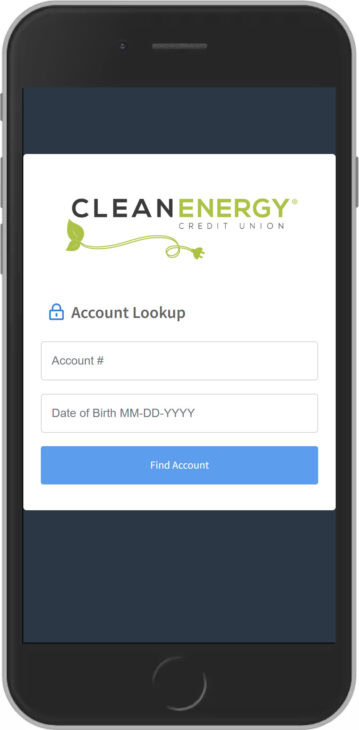
ONE: Account Lookup for first time users
The first time you visit our loan payment portal you will need to authenticate your account with your Account Number and Date of Birth.
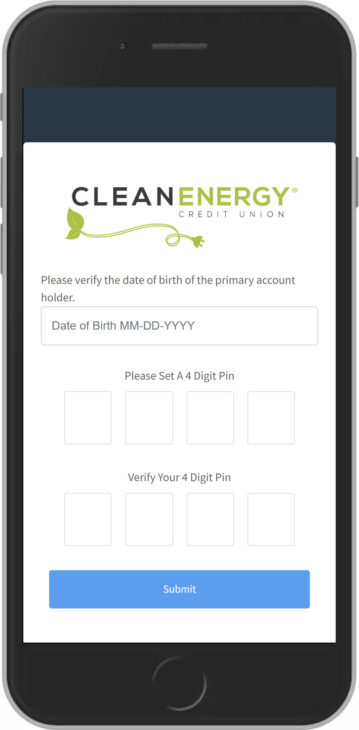
TWO: Creating Your PIN
Next, you will be asked to set a four digit PIN. This PIN will be used to make subsequent payments.
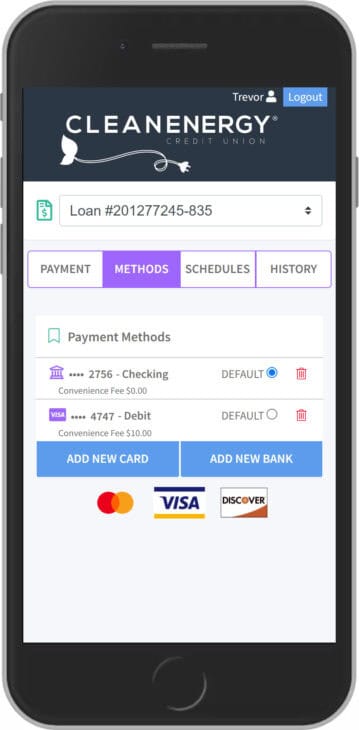
THREE: Add a Payment Method
Select “Methods” on the top menu. From this screen you can add new cards or bank accounts to pay from. You can add multiple methods and select which method you would like to be your “default” payment method.
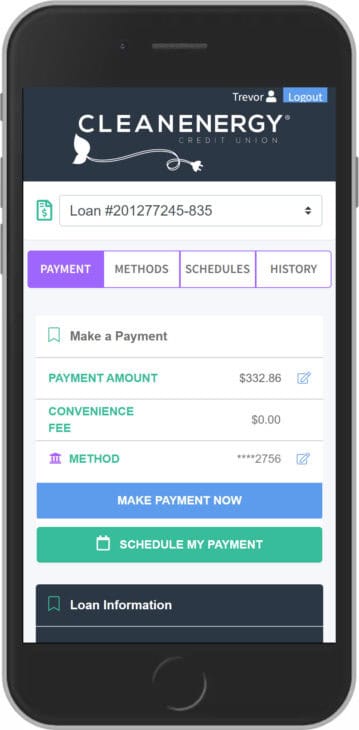
FOUR: Make a Payment
Click the PAYMENT button to make your payment. To edit your payment amount or to select a different payment method, touch the pencil icon to the right of the amount.
Got questions?
To bring you lower transaction fees and enhanced security features, we upgraded to a completely new platform. Your sensitive payment details could not be automatically transferred from the old system.
No. Members that use scheduled payments will need to reset them after June 30th. Please log in to the new portal to set up your automatic transfers and avoid any missed payments.
Absolutely. Rest assured this portal is safe and secure. Protecting our community is central to our values, and this system meets the highest modern standards for data security.